
+ FLOOR PLAN SOFTWARE
Free AI floor plan software for Windows
Describe the rooms you want, and AI CAD PRO draws a dimensioned floor plan you can keep editing. It’s free floor plan software for Windows, and its AI assistant runs on your own ChatGPT subscription.
FREE TO USE / WINDOWS / RUNS ON YOUR CHATGPT SUBSCRIPTION
An AI floor plan generator that leaves you in charge
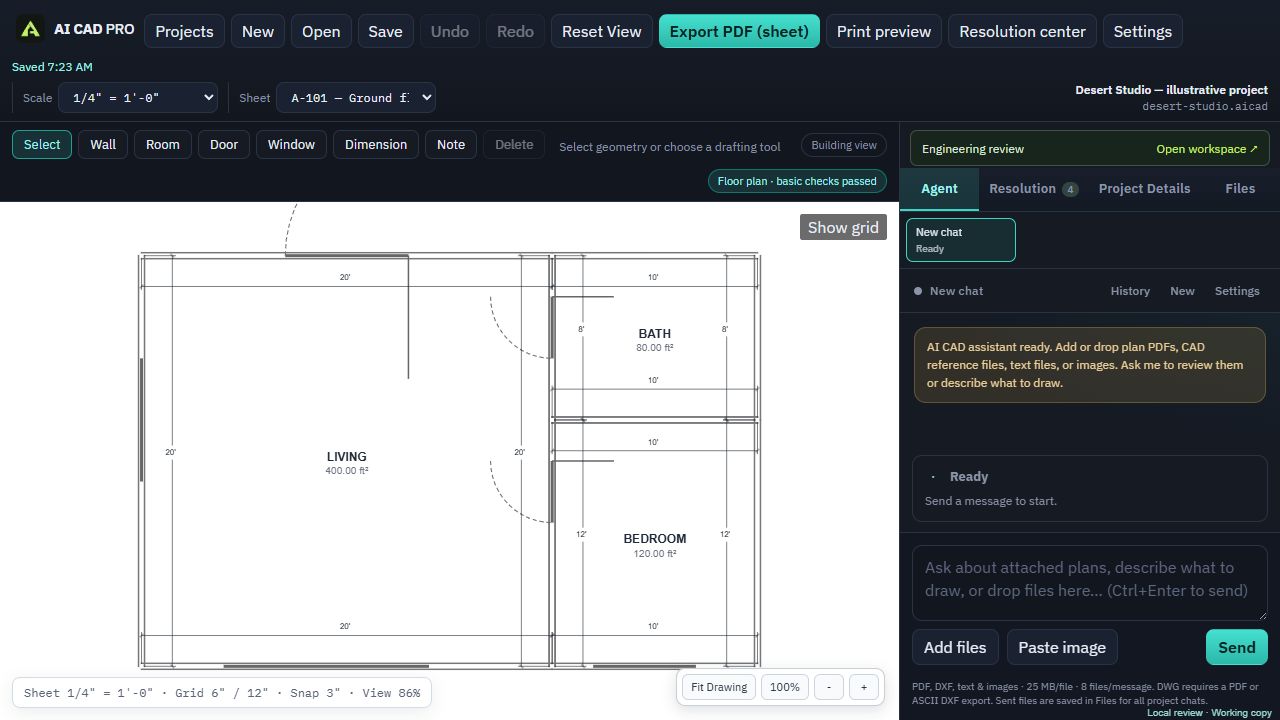
For a floor plan you intend to build from, look beyond the preview: you need dimensions you can check and drawing objects you can revise. AI CAD PRO creates an editable 2D drawing on your Windows PC.
You describe the plan: the overall size, the rooms, where the doors and windows go, the porch you’ve been picturing for years. The assistant draws walls, rooms, doors, windows and dimensions as real CAD objects. Then you both keep working on the same drawing until it’s right.
Some ways to start:
- “Draw a 28 by 40 foot single-story house with three bedrooms, two baths and an open kitchen and living room.”
- “Make the primary bedroom 14 by 16 and put the closet on the interior wall.”
- “Add an 8 foot deep covered porch across the front.”
- “Move the laundry next to the back door.”
Ask for revisions to the existing drawing, then inspect the result before continuing.
Try a small floor plan, then make one measured change
Start with a simple practice layout before describing a whole house. This example prompt is a drafting exercise, not a finished design or a permit plan:
“Draw a rectangular 20 by 24 foot studio floor plan. Treat those as outside dimensions and use 6 inch exterior walls. Put the entrance on the south wall and two windows on the north wall. Add overall dimensions and label the open room. Ask me for missing details before adding more rooms.”
- Check the first drawing. Compare the outside dimensions with your request. Inside clear space is smaller because walls have thickness. Check which wall each opening is on and whether its location matches your intent.
- Change one thing. Try: “Move the entrance 2 feet east along the south wall. Keep the outside footprint unchanged.” Inspect the door location and overall dimensions again; use the drawing tools to adjust an object directly when that is easier.
- Add the real constraints. Supply measured room sizes, wall thicknesses, opening locations and any existing features you must retain. Do not use a guessed dimension from a sketch as a site measurement.
- Review the sheet. Set its scale, open print preview and check that labels and dimension lines are readable before exporting a PDF. A readable drawing still needs the project-specific checks required by your building department.
For room layouts and more detailed requests, use the floor plan prompt examples. If you already have a sketch, follow the reference-file steps below.
Edit any wall, door or dimension yourself
You don’t have to describe everything. The drawing tools are right there when it’s faster to do it yourself: Select, Wall, Room, Door, Window, Dimension and Note. Drag a wall, retype a dimension, fix a label.
Rooms show their area, so you can see what a change does to the square footage while you work. Sheets are drawn at a scale you set, such as 1/4 inch to the foot, and every wall, dimension and note stays editable, whether you drew it or the assistant did.
You don’t need to know CAD to start. You’ll still want to review the plan carefully and give the assistant accurate information about your site and your project. It draws what you describe, so good information in means a good plan out.
Start from what you already have
Maybe you have a sketch on graph paper, the original plans for a house you’re remodeling, or a layout from a kit supplier. Attach it. AI CAD PRO accepts PDFs (including scanned plans), images, ASCII DXF files, and text or CSV files as references.
Ask the assistant to use the reference as a starting point, then check its dimensions against the original. Scans and photos can be unclear, and you know your project better than any file does.
AI CAD PRO can’t open DWG files. If a plan lives in other CAD software, export it as a PDF or an ASCII DXF and attach that. You can also reuse work from your other saved projects, like the plot plan you drew for last year’s shed.
From floor plan to a full sheet set
A floor plan is usually the first sheet, not the last. The same project can hold the sheets that build on it:
- Elevations and sections
- An electrical plan and one-line diagram
- A site plan showing where the building sits on your lot
- Solar plans if you’re adding panels
Print preview shows each sheet exactly as it will print. When you’re ready, export a coordinated PDF sheet set on Letter, Tabloid or Arch D paper.
Along the way, the Resolution center lists missing information and plan warnings, with a recommendation for each and where to find what’s missing. Drafting checks catch overlapping annotations, broken sheet references and notes that overflow their space.
What it doesn’t do
It’s worth knowing the limits before you download:
- It makes 2D plan sheets. It isn’t a 3D modeler, a BIM tool or an interior design app with furniture renderings.
- It doesn’t supply complete structural, mechanical, plumbing or other engineering calculations.
- Its drafting checks aren’t a code-compliance review. Your local permitting office decides what it needs and whether to approve, and some projects require an engineer’s stamp.
If you’re drawing plans for a permit, read the building permit drawings checklist first so you know which sheets to plan for.
What you need to run it
A 64-bit Windows PC, an internet connection for the AI assistant, and a ChatGPT subscription. Install AI CAD PRO, open Settings, sign in with ChatGPT, and describe your first room. Not sure what to ask? Start with these ChatGPT floor plan prompts. Your projects are saved on your own computer.
Prefer to pay per use? Connect an OpenAI API key instead; those requests are billed by OpenAI. Either way, AI CAD PRO itself is free.
GOOD QUESTIONS
Questions, answered.
Is this floor plan software really free?
Yes. AI CAD PRO is free to download and free to use on Windows. The AI assistant runs on your own ChatGPT subscription, so there’s nothing to buy from us.
Do I need to know CAD to draw a floor plan?
No. You can describe what you want in plain words, and the drawing tools are there when you want to make direct edits. You’ll still want to review the plan and give accurate information about your project.
Can I print my floor plan to scale?
Sheets are drawn at a scale you set, and print preview shows exactly what the PDF will look like. You can export on Letter, Tabloid or Arch D paper.
Can it make a 3D model of my floor plan?
No. AI CAD PRO is a 2D drafting tool. It makes floor plans, elevations, sections and other plan sheets, not 3D models.
FREE FOR WINDOWS
Draw your floor plan today.
Download AI CAD PRO for Windows, sign in with ChatGPT, and describe the first room. It’s free to download and free to use.
Windows 64-bit · Works with your ChatGPT subscription