
+ GARAGE & WORKSHOP PLANS
Garage plan software for the shop you actually want
A garage, a workshop, a barn: the building is simple until you have to draw it. AI CAD PRO is free garage plan software and workshop design software for Windows. Describe the building, and the AI assistant drafts plans you can edit by hand and export as a PDF set.
FREE TO USE / WINDOWS / RUNS ON YOUR CHATGPT SUBSCRIPTION
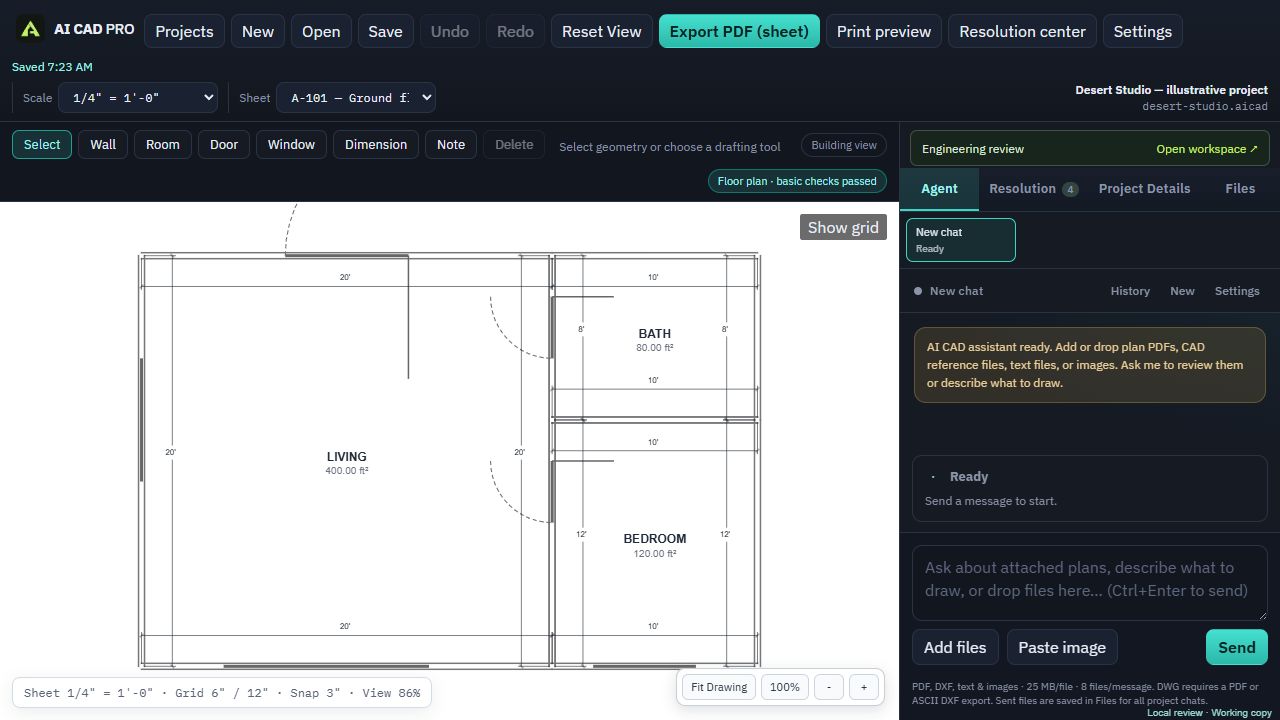
Test a garage workshop layout before drawing the whole set
A workshop plan has to fit the work as well as the parked vehicle. Use this dimension-budget exercise to compare layouts in the software. It assumes a 24 × 24 ft clear interior, not a 24 × 24 ft outside building. These are example inputs, not minimum clearances or a construction design; replace them with measurements of your vehicle, tools and required operating space.
| Across the 24 ft interior width | Example allocation | What to check |
|---|---|---|
| Wall storage | 2 ft | Actual shelf depth and handles |
| Vehicle and access zone | 10 ft | Vehicle width, open doors and a usable path |
| Open work zone | 10 ft | Equipment footprint, material travel and operating space |
| Workbench | 2 ft | Actual bench depth and equipment projecting beyond it |
The width check is 2 + 10 + 10 + 2 = 24 ft. Along the depth, an example 18 ft vehicle with 3 ft at each end uses all 24 ft: 3 + 18 + 3 = 24. Adding a rear cabinet would reduce that space. This is why a drawing of the empty building is not enough.
- Draw the clear interior first. Label the 24 × 24 ft interior and state the wall thickness separately so it is not confused with the exterior footprint.
- Add measured outlines. Ask for labeled vehicle, bench and storage rectangles using your own dimensions. Draw door swings and the route from the entry door.
- Test the tools in use. Add separate reference outlines for material infeed/outfeed and manufacturer-required operating space. An idle table saw fitting on the drawing does not mean a long board can pass through it.
- Compare one change. Try a 3 ft deep bench in place of the 2 ft bench. Keep the 24 ft width and all other zones fixed: the open work zone drops from 10 to 9 ft. Check that the revised drawing reflects that tradeoff.
- Coordinate the sheets. Once the arrangement works, locate doors, windows and electrical devices on the appropriate sheets. Recheck the layout when those positions change.
Try: “Draft a garage workshop with a 24 by 24 foot clear interior. Across its width, show labeled zones of 2 feet for storage, 10 feet for a vehicle and access, 10 feet for work, and 2 feet for a bench. Keep these as planning zones, ask for actual equipment sizes, and do not infer code clearances or structural sizes.”
AI CAD PRO makes editable 2D plans and PDF sheets, not a 3D walkthrough, a structural design or an automatic cut list. The Windows app is free; its assistant uses your ChatGPT plan or a separately billed OpenAI API key. For the site drawing, start with the annotated site plan example.
Workshop design software that starts with how you work
A good shop is laid out around the work: where material comes in, where the big tools sit, how far you walk between the bench and the saw. Put that in words, and the assistant turns it into a dimensioned plan.
- “Draw a 30 by 40 foot shop with a 12 foot overhead door on the south wall and a 36 inch walk door beside it.”
- “Mark out a 24 foot workbench along the north wall and a space for the table saw in the middle.”
- “Add windows over the bench and a note for the dust collector in the northeast corner.”
- “Make the building 4 feet longer and keep the doors where they are.”
Everything the assistant draws is a real CAD object. Move the bench, resize the door, retype a dimension. You can use the Select, Wall, Room, Door, Window, Dimension and Note tools whenever it’s faster to do it yourself.
Garage plans for a permit
A detached garage or a large shop usually needs a building permit (see do you need a permit to build a garage). Your building department sets the list, but garage plans commonly include:
- Site plan. The building on your lot, with setbacks, the driveway and utilities.
- Floor plan. Overall dimensions, doors, windows and the slab or floor.
- Elevations. All four sides, with the building height and roof pitch.
- Sections. A building section and a wall section, from the footing to the roof.
- Electrical plan. Outlets, lighting, any subpanel and the feeder from the house.
AI CAD PRO draws each of these as its own sheet in one project, with notes, dimensions, hatching, leaders and detail references. Print preview matches the PDF, and you can export the set on Letter, Tabloid or Arch D paper. For the full list, see the building permit drawings checklist.
Barns and pole barns
Post-frame buildings are a favorite for homesteads: a pole barn for hay and equipment, a machine shed, a barn with a lean-to for animals. You can plan them the same way. Describe the bays, the doors and the lean-to, and the assistant draws the plan, elevations and sections.
Post-frame and truss designs are often engineered by the building supplier or truss manufacturer. If you have their drawings, attach the PDFs as references so your plans match them. Some jurisdictions treat agricultural buildings differently from garages, and zoning rules still apply, so ask your building department how they classify yours.
Power for the shop
Shops need more power than most buildings their size. Lay it out on an electrical plan: receptacles along the bench, lighting, a circuit for the compressor, the subpanel and the feeder from the house. The one-line diagram is built from the equipment you place and the connections you define, so it shows what you actually plan to install.
Drafting checks flag missing connection or specification data before you export. Electrical work usually needs its own permit and inspection.
Bring in what you already have
Attach a survey or plat for the site plan, a kit supplier’s drawings, equipment spec sheets, or photos of a sketch. AI CAD PRO accepts PDFs, images, ASCII DXF files, and text or CSV files. It can’t open DWG files, so export a PDF or an ASCII DXF from other CAD software.
Already drew your lot for another project? Ask the assistant to reuse that plot plan from your saved project.
What it doesn’t do
AI CAD PRO doesn’t size beams, headers, trusses or posts, and it doesn’t supply complete structural or other engineering calculations. Its drafting checks aren’t a code-compliance review. Larger buildings, long spans and sites with high wind or snow loads may need an engineer’s stamp. The engineer stamp guide explains when.
GOOD QUESTIONS
Questions, answered.
Is the garage plan software free?
Yes. AI CAD PRO is free to download and free to use on Windows. The AI assistant runs on your own ChatGPT subscription.
Can I keep the garage, the shop layout and the site plan in one project?
Yes. Each drawing is its own sheet in the same project, and you can export them together as one PDF sheet set.
Does it design trusses or size beams?
No. It doesn’t supply structural calculations. Use your truss manufacturer’s or supplier’s engineering, or an engineer, and show their information on your plans.
Can I plan a pole barn with it?
Yes. Describe the bays, doors and any lean-to, and the assistant drafts the plan, elevations and sections for you to refine.
FREE FOR WINDOWS
Plan the shop you’ve been picturing.
Download AI CAD PRO for Windows, sign in with ChatGPT, and describe your garage or workshop. It’s free, and there’s nothing to buy.
Windows 64-bit · Works with your ChatGPT subscription